
Featured Guests
– Research and innovation in media & entertainment
Topics covered in this episode
“If you don’t have your data pipeline figured out, it’s going to get away from you really quickly. You’ve got to keep it front and center so it works for everybody.”
TOM THUDIYANPLACKAL, EXECUTIVE PRODUCER (AI, Virtual production)
Related stories


Ready to level up your workflow?
iodyne’s workflow experts and product engineers are happy to hear about your unique challenges and help you design an efficient solution for your project.
Frequently Asked Questions
Can iPhones be used in professional film production workflows?
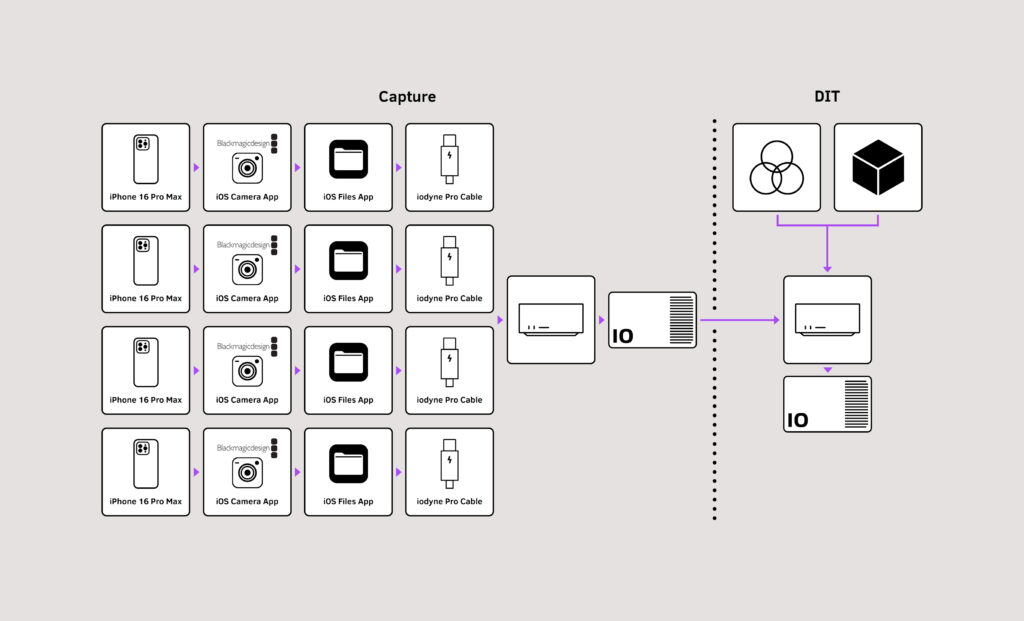
Yes. Modern iPhones are increasingly used in professional production, particularly for multi-camera shoots, b-roll, and experimental formats. Managing the data from multiple iPhones alongside traditional cinema cameras requires a thoughtful workflow design.
What is the USC Entertainment Technology Center?
The USC Entertainment Technology Center (ETC) is a research center at the University of Southern California focused on emerging technologies in entertainment. It brings together studios, technology companies, and academics to explore the future of media production and distribution.
How does AI change data workflow design for film production?
AI is beginning to play a role in data workflow automation, from intelligent file organization to automated quality control and metadata tagging. Designing workflows that can accommodate AI-generated data alongside traditional camera footage requires flexible, high-speed storage infrastructure.
What does Iodyne’s Workflow Kitchen cover?
The Workflow Kitchen is Iodyne’s editorial series exploring practical data workflow solutions for professional media production. Each installment focuses on a specific tool, technique, or production scenario and explains how good workflow design and fast storage work together.
How do you design a data workflow for a multi-device production?
Multi-device productions need a centralized, fast storage solution that can accept data from multiple sources simultaneously. A well-designed workflow defines how each device’s footage flows from camera to primary storage, through verification and backup, and on to post-production.